‘Ask for what you want’ is a key skill for the 21st century

This is an update to my post about apps as home-cooked meals, which has found a large audience over the years. That post, published in February 2020, discussed personal software, designed and built in different ways, for different reasons, than industrial apps.
What’s changed between 2020 and today? Oh, just the entire process and practice of computer programming. Here, right up front, I decree: building a personal app with the help of AI agents still totally counts as “home cooking”. You’re no longer grinding the flour by hand; fine. This is a cool development. You do still have to make the meal taste good, and this still requires care and effort. Fine.
The AI industry’s immediate future has more to do with exotic finance and gnarly politics than the underlying technology. I’m not invested in that future; most days, I think a minor bust would be a good thing. But, that underlying technology, in its development and flourishing this past year —
Ask for what you want.
It began during one of my drives between the San Joaquin Valley and the San Francisco Bay Area, always an opportunity for daydreaming, generator of many voice notes. On this drive, back at the start of summer, I was doing some meta-daydreaming, pondering how my notes app worked, and didn’t, and I thought: “Robin, just tell the AI agent to make the app you want.”
I got home, and I told it, and I cooked dinner, and by the time I went to bed, I had my new notes app, native macOS. I began using it immediately, and over the next couple of weeks I refined it, explaining my preferences to the AI agent. The app has taken pole position on my dock, and I use it every day.
I’ll explain my process in more detail, but first, I’d like to propose an exploratory program. This is recommended for anybody/everybody, but more pointedly for creative people who are wary about AI. I’m wary, too —
And … even if you were an enemy of the railroad corporations, the vast syndicates … would you deny yourself the pleasure of the train?
This exploratory program only works with the summer 2026 generation of models:
-
Download the desktop app for either Claude or ChatGPT.
-
Pay for the monthly plan that gets you access to the top-tier model, either Fable 5.1 or GPT-6 Astra —
just one month. -
This is a trial, a test, an education. Well worth it.
Why even publish this post, when the internet is awash with AI boosterism, AI-can-change-your-life-ism, tell your Claude to do this, teach your ChatGPT to do that? Because I think my approach is better, obviously. The consensus vision seems to involve AI working for you day-to-day, a constant ambient presence, sparkles in everything; even cautious Apple has succumbed. I’m not interested in that.
My alternative: get your wish, then stuff the genie back into the lamp.
As you begin your exploration —
So … what DO you want? For me, this was straightforward. I have always used a rotating collection of apps for writing, note-taking, managing images, and more, so it was an easy call to say, “those, but simpler and faster”.
Alternatively, you might think about computer tasks that are currently annoying or overwhelming. As the capstone for my AI summer, I built myself an email client! It’s very simple, just a particular view of my professional Gmail account, filtering and presenting a subset of messages, sparing me the full kinetic impact of my inbox. It’s called Grand Vizier. It’s great.
That’s all very “productivity”. It would be just as good, even better probably, to ask for something fun. A game! Or, how about, I don’t know, a jukebox to play music from a streaming service, without all that extra junk they cram in there. Doesn’t matter which service you use —
There’s a crucial limitation here, which is that your need or desire must live “inside the box”, within the realm of apps and files, pixels on screens. Most of life doesn’t happen in here. If, indeed, none of your needs or desires are app-shaped … well, that’s not unusual! I have chatted about this with several friends who pondered a while, then declared: “I don’t have any problems that software can solve.”
If that’s you, close this tab and proceed with your day.
When I arrived home after my daydreaming drive, I sat down at my laptop and … did NOT open an AI agent. Instead, I spent an hour writing a document explaining what I wanted. I pulled in references to an old app I used to love. I wrote at length about what I didn’t want my app to do.
There’s an appealing looseness that is available, writing this kind of document for an AI agent. You should imagine the agent “reading everything at once”—all the words understood in parallel, their relationships and cross-dependencies and even inconsistencies simultaneously available. Rather than “a clear, sensible explanation”, you are aiming for “useful guidance on the page”. More is usually better.
Here’s the exact doc I wrote on that night, which I titled VISION.md. I offer this not as any sort of “best practice” but simply as an example of how you can approach these.
VISION.md
We are going to built a lightweight, super minimal, VERY VERY fast notetaking and reviewing tool for macOS! Super fun!
We’ll write this in modern Swift, keeping it as simple as possible. Really lean system. It targets macOS Sonoma and above.
There are a few inspirations to know about.
One is the classic macOS program Notational Velocity. You can do some web searches to learn about this app. There’s a screenshot in nv-main-window.png.
We want to reflect NV’s obsession with speed. Now – our demands aren’t infinite. This isn’t like a live scrollable database of millions of notes. In fact it probably doesn’t even have the same demands as, e.g., the Apple Notes app, or the Photos app on iPhone. We are looking to support in the range of ~20,000 notes. So it’s very possible we can just like … load all of these into memory! Right?
The source of the notes will be a selectable local directory. Sync will happen via another engine – Dropbox, in most cases. The point is, all we have to do is worry about local files. We DO want to detect when they change / are updated / added / removed, etc., but I suspect we get this “for free” simply by following macOS best practices.
Setting this sync directory should be the app’s one main setting. It should have a settings/prefs window, just like an macOS app, reachable by a menu item, and the usual keyboard shortcut. We’ll start with just this one single setting.
Another inspiration is the app Bebop, by Jack Cheng – https://jackcheng.com/bebop/ – which is where most of our notes come from, in practice. Bebop is the mobile “writer” app and this app we’re building is the “reader” app.
Oh, I forgot to mention, this app will be called Rocksteady.
The notes will be Markdown files, sometimes plain text – the app should handle both easily. Rendering Markdown correctly is NOT a goal for a first version – we should just display the plain text.
We’ll want to implement NV’s very very fast search, which does a “live filter” – so, in the search field, as I type “bat”, it insta-filters all the notes, showing me only notes with “bat”; then, as I continue typing, to write “batm”, it shows me only notes with “batm” … and so on. (This will be all my “batman” notes, of course.)
I don’t think fancy search tech will be needed for this – again, the quantity of notes is such that a relatively simple search algo operating on text in memory should be sufficient. However, if you disagree with this assessment, please let me know!
The design should be “classic macOS”, using entirely default controls/buttons/widgets/etc. – nothing custom at all. We are making a really “Mac-assed” app here … in a sense we wish it was a classic macOS app, back in the days of System 7 … but we’re stuck with modern macOS, so, we’ll make the best of it.
The app only allows you to look at one note at a time, the one currently selected. No tabs, no sub-windows, etc. – it’s very simple that way.
The app should also allow me to edit notes, of course. I’m sure this can be accomplished with some default macOS text editor pane/widget. The behavior should be, when I start editing, a note is marked “dirty”, then I have to hit “save” (menu command, or command-S) to save my changes. Or, if I attempt to navigate away from it, the app should warn me with a dialog, “Abandon changes”? – again, super simple, super classic behavior.
The app should support basic undo – I assume we get this for free from macOS? I hope so??
No support for inline media, images, etc. – this is strictly text notes. HOWEVER if there are images in the synced folder – or indeed any other kind of file – the app should handle them gracefully. I think the best behavior would be to show them in the “notes list” as entries but make them grayed out, unclickable. Maybe we’ll add a feature later where clicking them opens them in the default handler app … maybe!
The app’s layout should mimic a classic “note titles on left, note body on right” layout – most notes app do this. You can see a screenshot example in app-layout.png. The search bar should be on the top of the left column.
Obviously, all the variables that dictate the layout (default width of note list, font sizes, etc.) should be vars in the code – so we can potentially wire them up to prefs/settings later. But we can start simple to make sure things are working.
As a first step, I’d like you to produce a PLAN.md outlining an implementation approach.
Ask me any questions that might be helpful, then proceed. Let’s build Rocksteady!
(Please excuse my relentlessly chipper tone. I do believe it produces better results. What a weird technology.)
This level of description isn’t strictly necessary; in fact, a sensible alternative is to cut straight to my last line: “Ask me questions.” The AI agents have all been trained to do this, and they’ll happily extract the information they need. That said, I think this writing exercise is valuable, if only to prepare yourself as a creative partner. If you’re going to ask for what you want … you need to know what you want.
Okay, so, you write the doc, and you ask the AI agent to read it and produce a plan, and you look at that plan, and you say, make it so! The AI agent goes off and does its thing, working quietly for between ten and forty minutes.
That’s what I did, and before I went to bed, I had my notes app. It was, honestly, dizzying to see the new icon waiting there in my dock. It was exactly what I wanted.
Over the next couple of months, I refined the app, but only a little. It was, and is, basically finished. I suppose it helps that I had all my old notes to decorate this new space, making it instantly useful. Another point for plain text files.
That success emboldened me to build an iOS sidecar, a capture-only notes app that is truly, gloriously, a Homer Car.
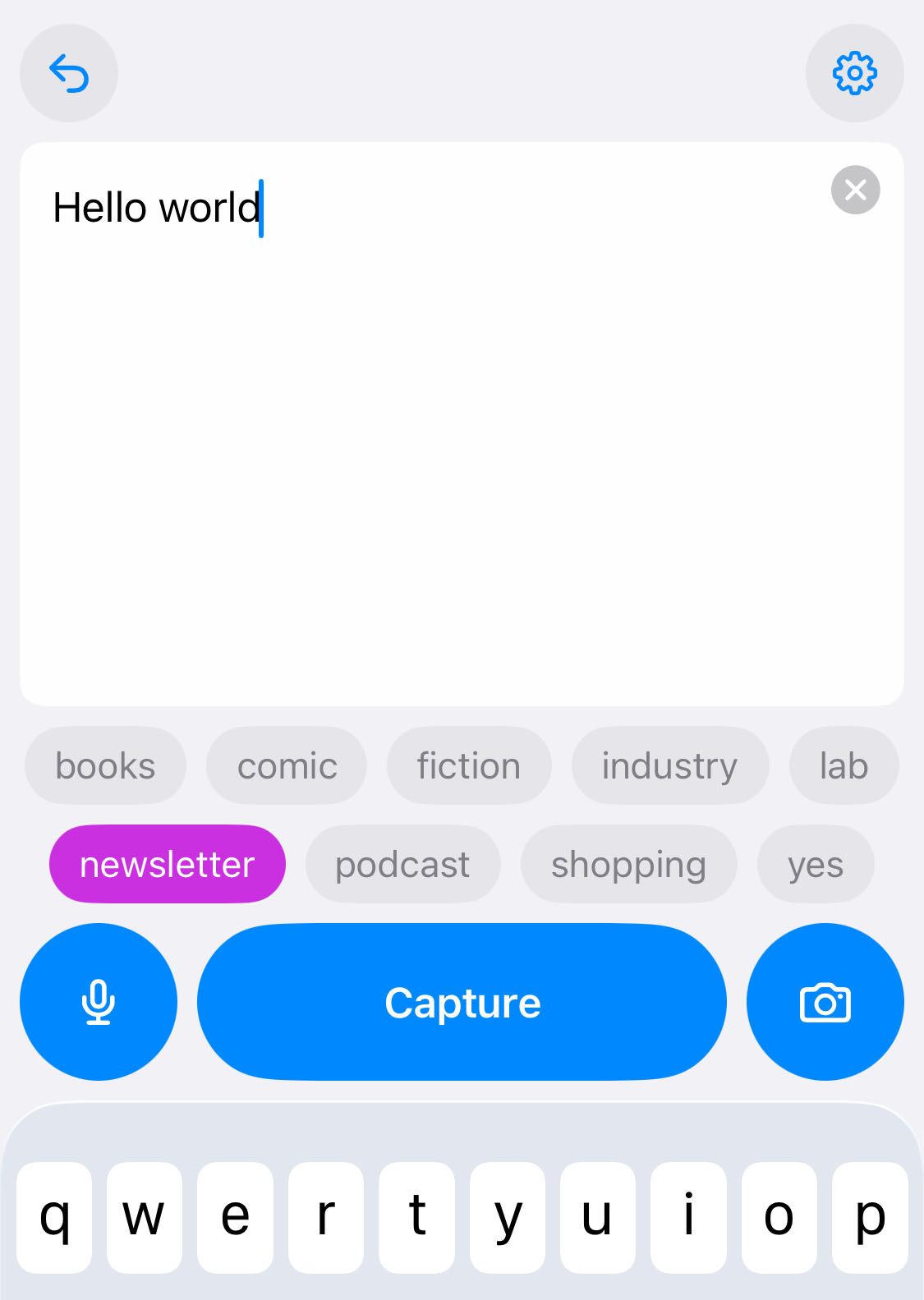
This approach to software complicates traditional notions of “good design”, which are premised on the designer and the user being different people. When you are both, anything/everything becomes sensible, because the underlying logic is always totally clear to you! It’s sort of weird and amazing … a different experience of software. No mysteries.
Implicit in this view is a sense of “continuous co-building”, which is how I approached these apps. Each began as something absurdly simple, barely anything at all, that I began to use immediately. As I felt myself reaching for missing capabilities, I kept a list. Over coffee, I’d ask the AI agent to implement them.
This process wasn’t particularly fast, maybe not even particularly efficient, even with the AI agent cranking out code at warp seven. I took screenshots and pasted them into the chat and said “this looks weird”. I asked for new features, tried them once, said, “no, I was wrong, rip that out”.
Working this way, you must become unembarrassed about nitpicking. You must become Steve Jobs, pointing out every misalignment, every detail insufficiently considered. You can be nicer than Steve Jobs, though.
Understand: if you embark on this exploratory program, it will become your hobby for the next few weeks. It will be the thing you do in the quiet of the morning, over coffee, or in the quiet of the evening, before bed. If you are superbusy, if you have no quiet, this is probably not for you. That’s fine.
I have produced plenty of apps on my own; working on them this way feels totally different. Before, the prospect of any modification or expansion carried an underlying “oof”, the knowledge of the slog to come. Now, there is only a light and inviting “what if?”
And, no: I don’t look at the code.
For me, the aim is always a finished, standalone program —
I’d rather work with an AI agent to construct steady, sensible tools that will continue to work, no matter what. Call this Battlestar Galactica engineering: you must at least IMAGINE the Cylon uprising, and ensure that your spaceship will still function if or when that day arrives.
“Your spaceship”, in this analogy, isn’t only your software, but your mind. Making these apps, I felt my programming muscles wither in realtime, the timelapse of the rotting apple. The idea of writing code by hand now feels … not impossible, but just SO excruciating. That feeling honestly frightens me, and I intend to keep it firewalled into this domain.
One of the things I’ve come to enjoy is asking the AI agent to grind out performance improvements: “How can we make this snappier? How can we make it load faster? What’s the slowest thing about this app, and how can we fix it?”
I suppose this is another reason I recommend starting with a native desktop app, rather than a web app —
You can ask for other things, too: “Review this code and make sure it’s simple, sturdy, and maintainable. If things have gotten too complex or wonky, find a way to rein them in, so everything feels really tight and solid.”
The AI agents will happily do this again and again, as many times as you want.
Discussing these AI systems, everybody wants to talk about “intelligence”, but I don’t think that’s the profoundest thing about them. Rather, I believe it’s the other -ences: patience, diligence.
That latter one is important for me. I think of all the creative programs I’ve written, little scripts to render cool images, or maps, or whatever … always with a trail of shrapnel behind me —
Well, the AI agent really, REALLY wants to record the configurations. It will spin up a little web page admin screen to track all the different permutations and trials. It will do that in two minutes. This basic diligence and organization has been as transformative for my work as anything else.
Okay, so. With the help of the AI agent, you make your first app. It bounces merrily in the dock. I want to underscore, what’s important is not that it’s a notes app, or a sleek jukebox, or whatever. You can already get every kind of app. What’s important is that it’s yours. It’s weird and specific, and it won’t change unless you want it to change.
I propose a new and ongoing habit, asking this question: Is the computer working the way I think it ought to work? No? Okay, I’ll ask the AI agent to help me change it.
This even applies to the agent itself, which is, of course, just software. Do you wish you could interact with it differently? Do you wish it would present its findings to you some other way? Just ask.
There it is, the radical offering of 21st century computing, here at last: ask for what you want. It takes practice! And, honestly, a certain audacity.
The moment of asking for an app and getting it is dangerous, because you feel like you accomplished something. You didn’t —
You do, at some point, have to use your tools. You do have to actually make something.
Rules for personal software produced with the help of AI agents:
-
You must actually and consistently use anything you build for two months before posting about it.
-
Ideally, never post about it. (I know I am breaking this rule, but my purpose is pedagogical, and anyway, I’ve got more apps I didn’t tell you about.)
-
Don’t let the AI agent name the app. You pick the name.
-
Don’t distribute the app, not even for free. Don’t post the code on GitHub. This is not software for glory; it is software for you.
The Culture novels of Iain M. Banks imagine a distant future that’s both dystopia and utopia. Dys- because the management of spacefaring civilization has been given over almost entirely to vast machine Minds, and u- because, well, you can ask them for whatever you want.
It’s fun and provocative to read Banks as a dream of how far the genie can go. In his books, the Minds have mastery over not just information but matter, so characters are always like, asking for asteroids to sculpt … requisitioning small stars.
Likewise, Star Trek’s depiction of the ship’s computer, particularly in The Next Generation, has suddenly snapped into prescience. This bravura scene, in which Geordi solves a mystery using the computer, is the best dramatization I’ve ever seen of this new way of working, better than Iron Man’s Jarvis by far:
Put the Holodeck to one side; Geordi could easily be working at a screen. Watch him ask for what he wants —
I think you should try my exploratory program because you’ll get something useful and/or fun out of it, and also because it is possibly the only way to understand the state of this techology today. Reading articles and posts (including this one) won’t get you there. And, some of the news is good! Working with an AI agent of the summer 2026 generation, you will realize its capabilites are prodigious, yet tightly circumscribed. It lives inside the box.
Yet … I’ll confess, working with the AI agents more closely has also stirred in me a fear that’s not just intellectual but visceral —
I’ve spent years engaged by AI, yet between this time last year and today, it become something totally new —
